
GW10 is a fairly chunky FME update.
Two of the tools we wanted from the start are now live: FPL Player Comparison and FPL Captain Picks. We have also added max-price filtering to the main projection boards, refreshed the site with the new GW10 data, and tightened a few of the less glamorous bits underneath it.
The idea is simple: you should now be able to go from “who looks interesting?” to “which of these players actually suits my team?” without leaving FME or doing three separate spreadsheets of your own.

Player Comparison: put the actual decision side by side
The new FPL Player Comparison tool lets you compare between two and five players at once. It is built for the decisions where a big projection table is useful, but not quite enough: two midfielders at the same price, three defenders for one transfer slot, or a captaincy shortlist you want to inspect properly.
The current-Gameweek view lines up projected points, 10+/15+/20+ haul chances, P90 ceiling, DEFCON probability, price, ownership, value and matchup-specific fixture context. Stronger figures are highlighted in green and weaker ones in red, so the shape of the comparison is easy to scan without pretending that one metric answers everything.
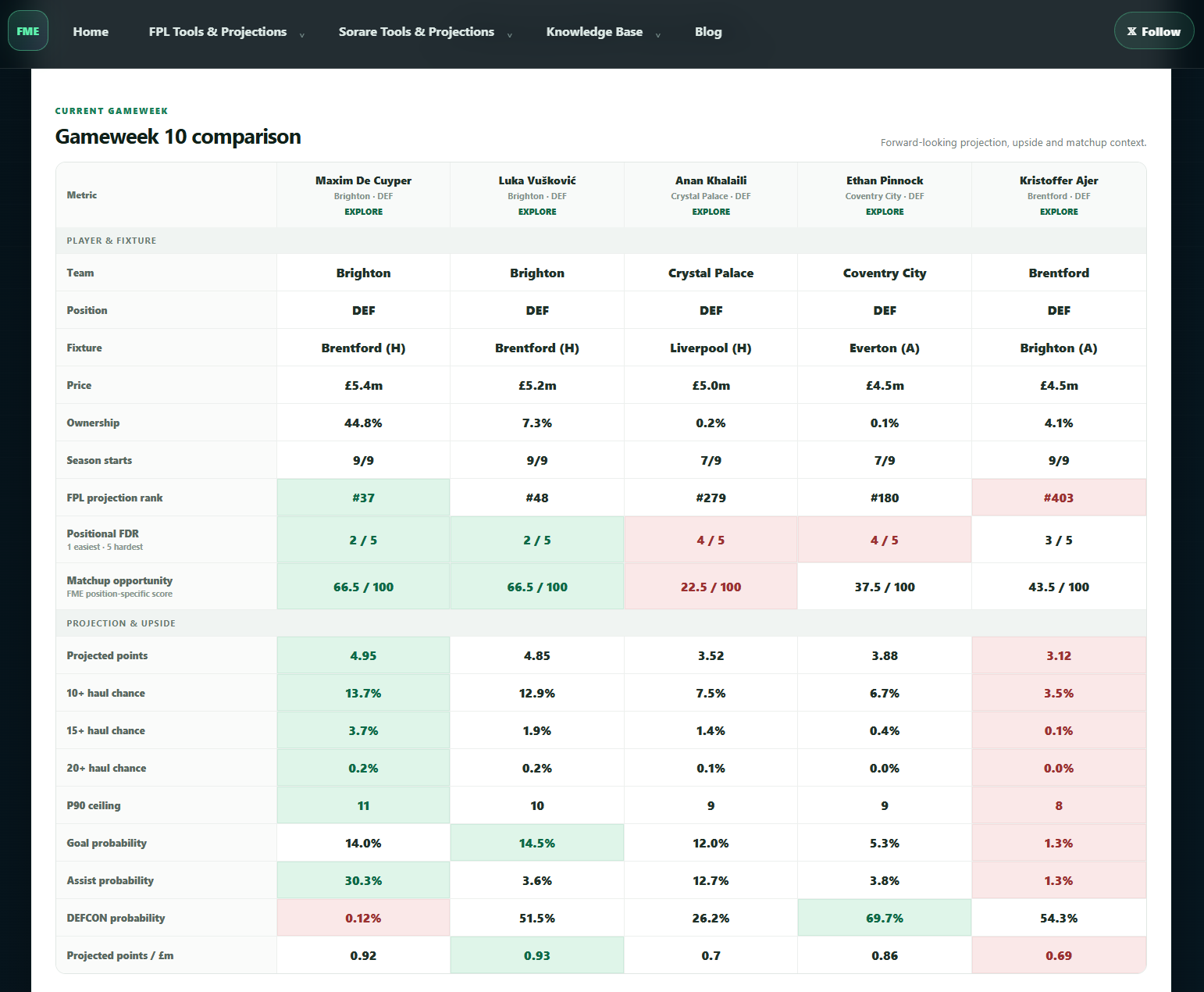
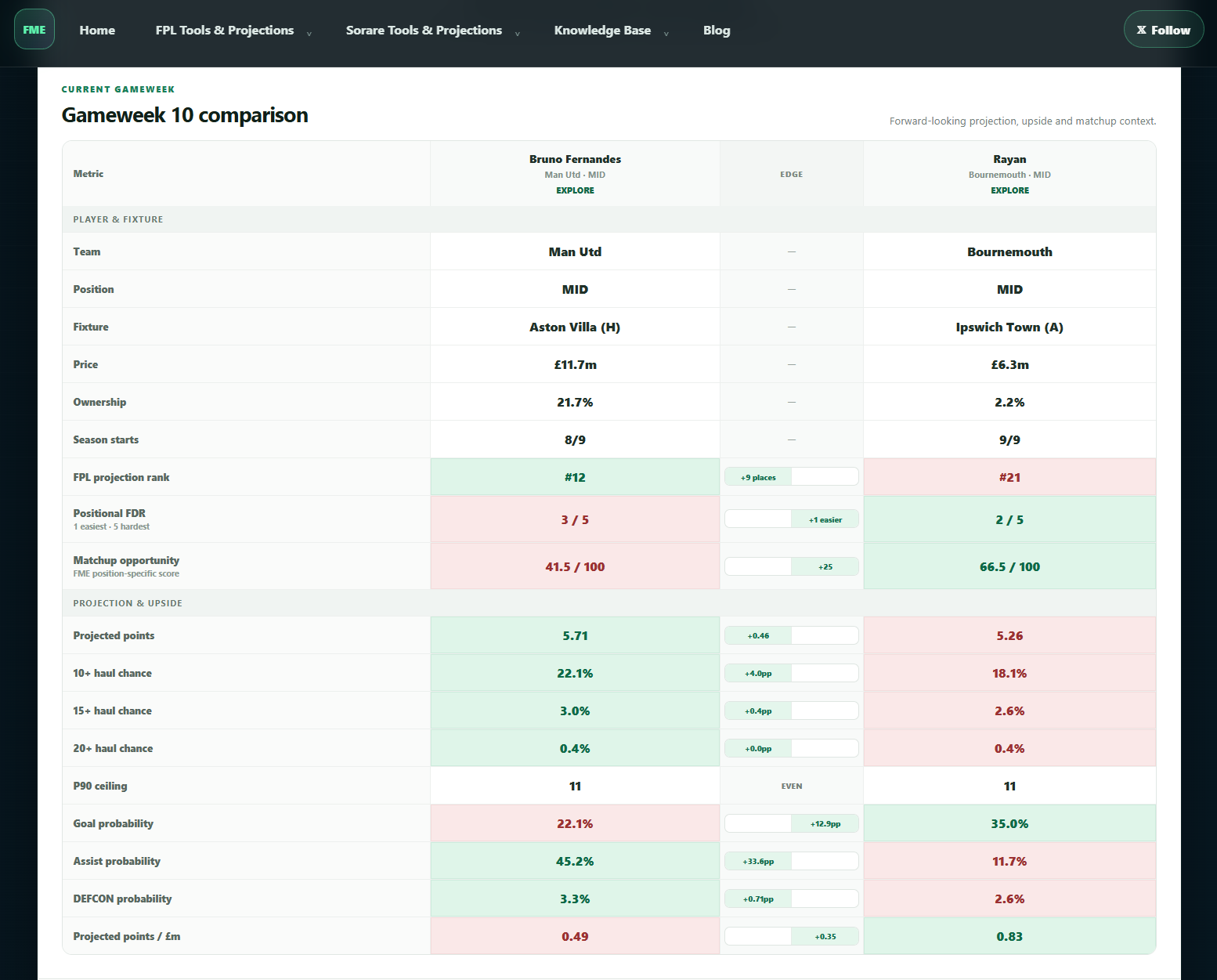
For a straight head-to-head, the two-player view also shows an Edge strip to make the gaps easier to read. Add a third, fourth or fifth player and the page switches to the wider comparison without trying to force a fake “winner” out of every row.
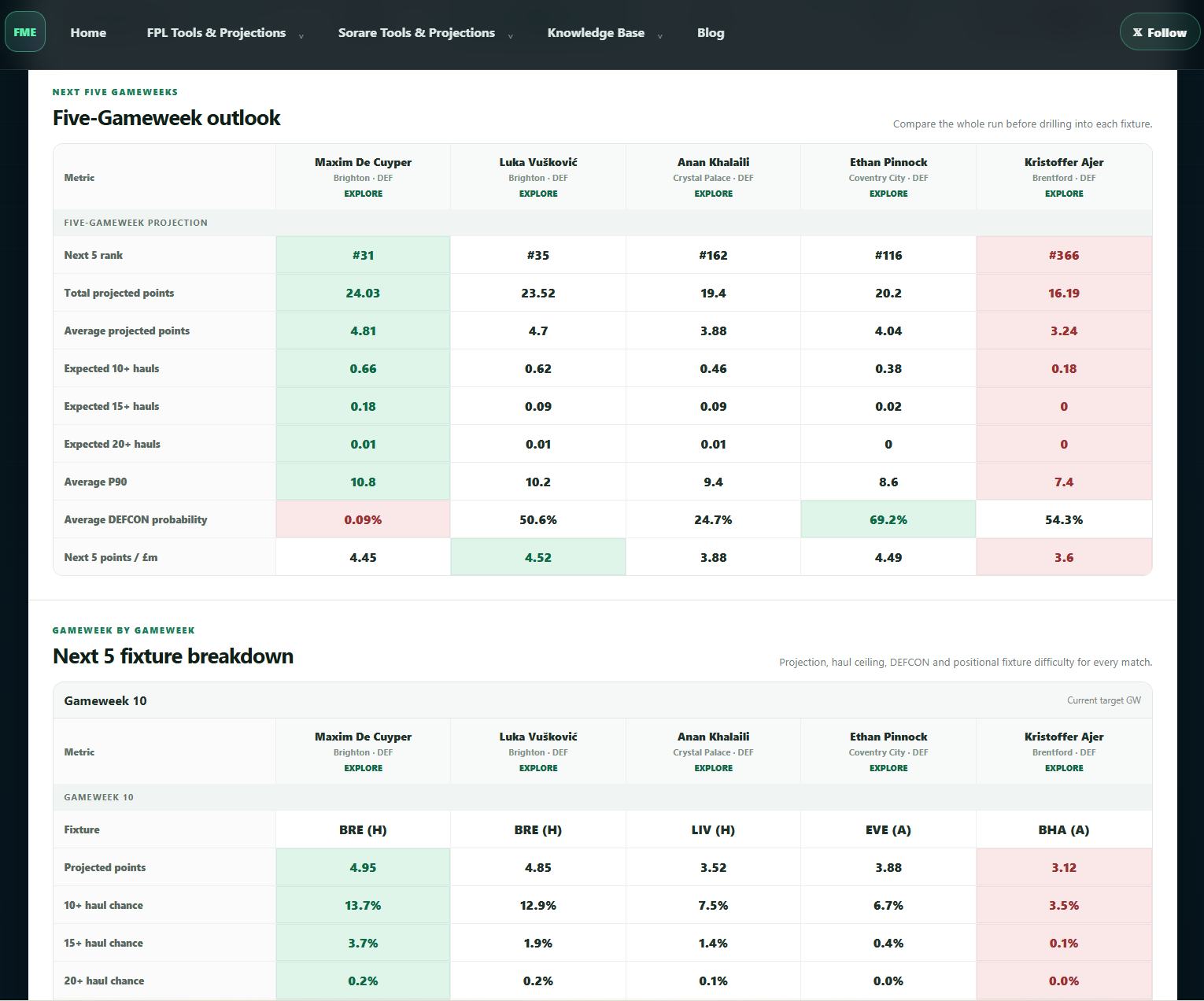
The useful bit for transfers is that the comparison does not stop at this weekend. Switch into the Next 5 view and you can compare the same players across the wider run: total projected points, average output, expected haul counts, DEFCON outlook, value and each individual Gameweek. If a player only has one spectacular fixture before the schedule turns ugly, it is much easier to see.
And if you want more context, click into a player from the comparison itself. The current Gameweek can open the richer matchup profile — including the FME WHY explanation and projected action fingerprint where available — while future weeks stick to the fields we genuinely project for those fixtures.
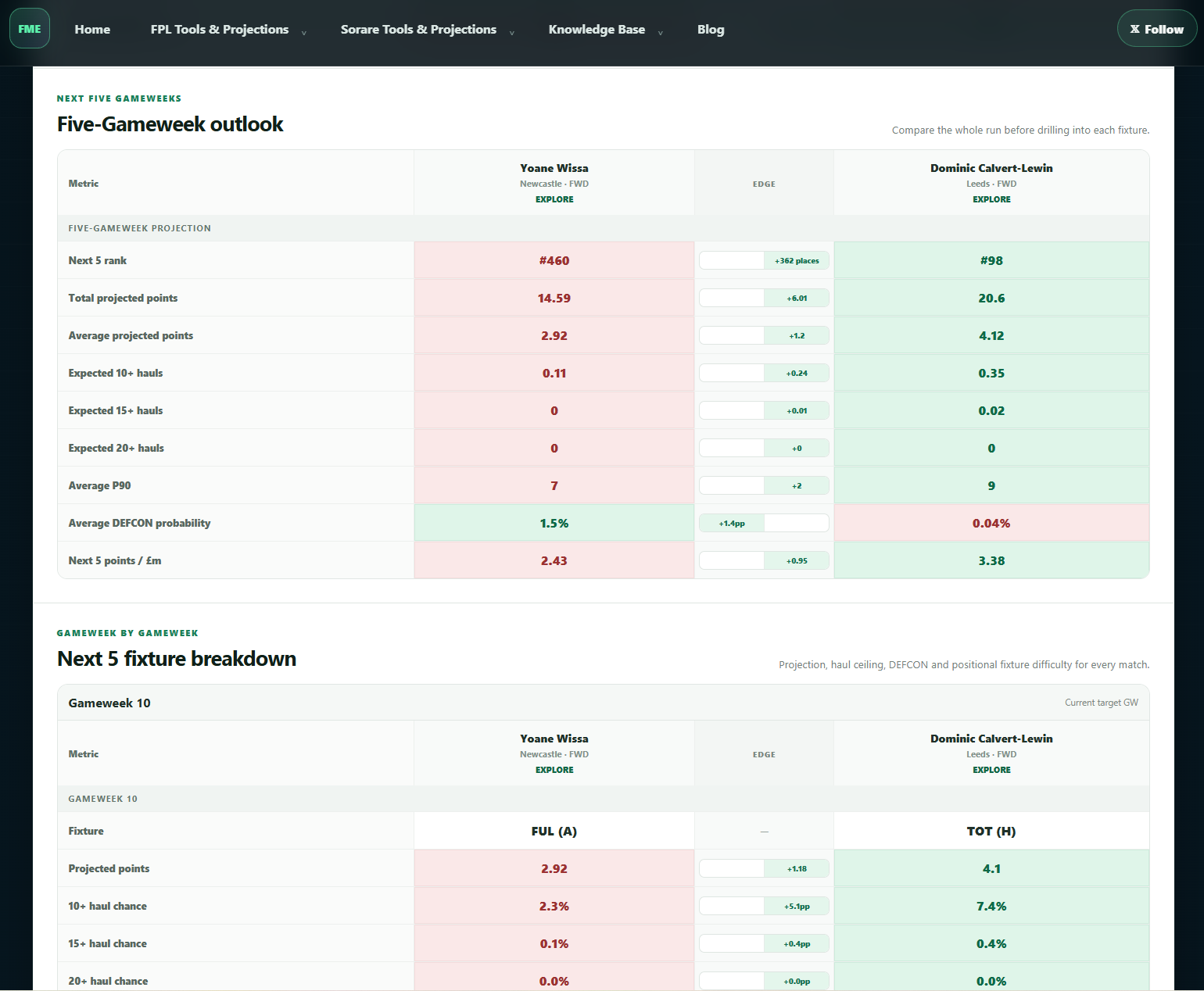
If you are only comparing two players, the Next 5 head-to-head view also keeps the Edge strip in place so you can see how the longer-run gaps stack up.
Captain Picks: average score is not the whole captaincy question
The other big addition is FPL Captain Picks. The obvious starting point for a captain is still projected points, but doubling the score makes the distribution around that average more important than it is for an ordinary transfer.
So the page can rank the same player pool by Projected Points, 10+ Haul, 15+ Haul or 20+ Haul. If you simply want the model's highest expected score, use the projection sort. If you are chasing a genuinely explosive ceiling, the 15+ and 20+ views make that visible instead of hiding it inside one mean.
The default Captain Edge score blends those ideas. Projected points remain the biggest part of the score, the simulated haul probabilities add the upside shape, and the rarer 20+ tail gets meaningful weight because a huge return matters more when the points are doubled. Start reliability makes only a modest adjustment, and lower ownership gets only a small boost — a weak projection cannot become a great captain just because hardly anybody owns the player.
There is also Differential Edge, which is really a practical ownership filter. Set any maximum you like — 50%, 20%, 8%, whatever suits the decision — and the shortlist immediately removes players above it. That lets you look for a differential captain without building a separate table or rewarding low ownership for its own sake.
By default, Captain Picks opens on Recent Starters. At the moment that means players who have started at least 65% of their club's completed Premier League matches this season. Switch to All Players when you deliberately want to explore the wider IF-STARTS pool.
Max-price filters are now on the projection boards
This one is less glamorous, but probably one of the most useful day-to-day changes.
The homepage FPL board, the full FPL Predicted Points page and the player-level Next 5 projections now have a Max price filter. Set the most you can spend and the player pool updates immediately alongside the existing position, team, search and starter filters.
That means you can now ask a much more realistic question. Not “who is projected highest?”, but “who is projected highest among midfielders I can actually afford?” Or “show me the best Next 5 defenders at £5.0m or below.”
The price options are built from the live FPL prices in the current handoff rather than a hard-coded set of bands, so the filter will move naturally as prices change through the season.
A few quieter GW10 fixes
The visible tools are the fun part, but the weekly data underneath them matters just as much. The site is now refreshed for GW10, with the Next 5 horizon running through GW14.
The current handoff has also been revalidated for fixture venue/order mapping before publication. That matters because a surprisingly large amount of matchup context depends on getting “home to Brighton” and “away at Brighton” the right way round. Not a very exciting feature card, admittedly, but exactly the kind of boring fix we want the pipeline to catch.
The rest of the existing tools continue to use the same refreshed data: Clean Sheet Odds, DEFCON Predictions, the fixture matrix and the deeper action-level projection views.
How to use the new tools together
If you want the quickest route through FME this week, this is probably the most useful workflow:
- Start with Predicted Points. Keep Recent Starters on, choose the position you need and set the maximum price you can actually spend.
- Build a shortlist in Player Comparison. Put the two to five realistic options next to each other and check whether the immediate projection, haul upside and matchup context tell the same story.
- Check the Next 5. If this is a transfer rather than a one-week punt, switch the comparison to the longer view or use Fixture Difficulty — Next 5 to see whether the move survives beyond GW10.
- Finish with Captain Picks. Use pure projected points for the safest starting point, then inspect the haul sorts or Differential Edge if you want to understand the upside behind the armband decision.
None of those tools is meant to make the decision for you. The point is to make the trade-off visible: immediate projection versus ceiling, one fixture versus five, secure starter versus IF-STARTS punt, template captain versus genuine differential.
Still the same model underneath
The new pages do not introduce a separate prediction engine. They are different ways of reading the same FME player-level matchup projections. We still project the player inside the expected match environment, simulate the fixture 100,000 times, and rebuild the fantasy outcomes from the actions produced in those simulations.
If you want the longer explanation, How Our Model Works goes through the approach. If you just want to start clicking things, the FPL tools hub now has a few more toys in it.
GW10 is live. Go compare some players, argue with Captain Edge, set an aggressively specific £6.7m price ceiling, and make your own call. Football remains fully entitled to ignore all of it.